Skip to content
What's new

Changelog

Every release, newest first. The things you can see and use.

v1.3.28Latest

Your play in charts, and a gold star for finished games

PRO adds play statistics, with charts for every session and a page for every game. Your library and the installed games manager are now part of PRO, any game can be removed from its own page, and games our team has checked from end to end wear a gold star.

PLAY STATISTICSPLAYED38hSESSIONS41STREAK6 daysFri, Oct 232h 10m
Every session in charts
MY LIBRARYPLAYINGWANT TO PLAYON HOLDCOMPLETED
Your library, shelf by shelf
INSTALLED GAMES24.3 MB612 MB88.1 MBSTORAGE ON THIS DEVICE724 MB used112 MB used
Installed games in one place
  • Play statistics come with PRO. You see your time played by day, week or month against the period before, your year on a calendar, and the hours of the week you play on your own clock. There are also top games, genres, decades and studios, session lengths, and a page for every game you have played.
  • Your library is now part of PRO, together with the installed games manager. If you made a library before, it is kept just as you left it and comes back the moment you go PRO.
  • Anyone can take a game off their device from the game's own page, with the bin at the end of its install row.
All 10 changes
  • Fully preserved now means checked by hand. A game earns it only after our team has read its page and checked its keys and its on-screen keys for phones. Such games wear a gold star on their page and beside their name on game cards.
  • Requests for a playable version now name who asked, and taking one back no longer makes it vanish. Each member can back up to 10 games at a time, 30 with PRO. The Wanted page shows how many you have used and lists your own requests.
  • A game's Controls tab is researched from the game's own manual and readme first, and every key has to be quoted from a source, so guesses and emulator shortcuts no longer slip in.
  • Even the biggest CD-era games now make it in: games larger than 4 GB, with a full install and several CDs, stream as you play, CDs and all.
  • Games tuned for more memory or a faster processor get the settings they were tuned for, so large role-playing games no longer stop on a black screen or hang on their loading screen.
  • Category, year and studio pages say what kind of games they hold in their titles, headings and search snippets.
  • The forums no longer jump while a page loads: each one shows placeholders shaped like what is coming. The footer's four columns are evenly balanced.
v1.3.27

Preservation status for every game

A new Preservation status page shows how complete every game in the archive is, games that have everything wear a Fully preserved mark, and the catalogue can list only those.

  • The new Preservation status page lists every game and what it still lacks. A game is fully preserved when it plays in the browser and has its box cover, at least three screenshots and, if it is played with keys, on-screen keys for phones. A gamepad mapping and backgrounds count as extras.
  • Fully preserved games say so at the top of their page and in their Specs, and the catalogue's Filters can show only them.
  • The changelog shows map scroll and the touch gestures in motion.
All 4 changes
  • The on-screen buttons drawn on the Pricing and Custom controls pages look like the real ones beside the stick.
v1.3.26

Scroll the map with your thumb

Strategy games can get on-screen arrows or a stick that scroll the map on a phone or tablet: hold one and the map runs, let go and the cursor is back where you left it.

Hold left · the map scrollsHold up · the map scrollsA corner · both ways at onceLet go · the cursor is back
  • On-screen keys can include map scroll arrows or a map scroll stick. Hold one and the mouse waits at that edge or corner of the screen, so the map of a strategy game scrolls; let go and the cursor comes back where it was.
  • Slide your thumb from one arrow to the next to change direction without the cursor jumping back in between.
  • Games that scroll only while the button is held at the edge get it held for them.
All 4 changes
  • Map scroll works whether you tap to click or use the screen as a touchpad.
v1.3.25

Tap or touchpad, with every gesture shown

The first game you play by touch shows what your fingers do, you can play by tapping or as on a touchpad, and games that move their cursor at a speed of their own keep it under the pointer too.

Open
TapLeft click
LookUseTake
Tap with two fingersRight click
Hold, then moveDrag
Spread two fingersSelect
  • On a phone or tablet, the first game you play shows what your fingers do: tap to click, two fingers for a right click, hold then move to drag, spread two fingers for a selection box. Settings keeps the same drawings.
  • Settings on a phone or tablet has a Touch choice: Tap to click puts the cursor where you touch, Touchpad slides it like a laptop touchpad. Each game remembers your choice.
  • Games that move their own cursor faster or slower than your mouse keep it under the pointer as well: the player works out how far each game moves its cursor, so it no longer drifts away or races ahead.
All 5 changes
  • A quick click on a laptop touchpad always reaches the game, even in games that only check the mouse buttons now and then.
  • The Catalog menu lists each way to browse, perspective, gameplay, setting and the rest, as one entry with a few examples instead of rows of words.
v1.3.24

Games at the speed they were tuned for

Many games that drew their scenes slowly now run at the processor speed they were tuned for, and games that stream take all their settings the next time you play, not only the compatibility ones.

  • Many games from the early and mid nineties get the processor speed they were tuned for instead of a slow default, so 3D scenes, characters and animation move smoothly instead of stuttering.
  • On a slower phone or tablet, a fast game gives up a little processor speed rather than its clock: music and timing stay right.
  • Games that stream now pick up every change to their settings the next time you play, processor speed, memory and sound included, where 1.3.22 brought only the compatibility settings.
v1.3.23

The cursor goes where you point

In games that draw their own mouse cursor, the cursor now sits right under your mouse or finger without capturing the mouse, a tap clicks exactly there, and a phone layout of on-screen keys can start from your desktop one.

  • Point-and-click adventures, strategy and other mouse games follow your mouse exactly, without clicking to capture it first: the game's own cursor sits under the pointer and lines up again whenever the pointer comes back onto the picture.
  • On a phone or tablet the cursor jumps under your finger and a tap clicks right there, even straight after a new scene. Holding then moving still drags, and a two-finger tap still right-clicks.
  • The on-screen joystick that moves the mouse is gentle when you push it a little and fast when you push it all the way.
All 6 changes
  • A controller or a keyboard that shows up as one no longer pushes the cursor to one side on its own.
  • In the on-screen keys editor, Copy from starts a phone or tablet layout from another screen, key size included, and outlines every key you change afterwards.
  • Newsflash brings short news about game ports, emulators and fan projects.
v1.3.22

Older games that start through their own launcher

Games whose little start program opens the real game no longer drop back to DOS right after "Now loading", streamed games get the same compatibility settings as the rest, and a game set to the classic DOSBox core really runs on it.

  • Older games that start through a small launcher of their own, which then opens the game itself, no longer return to the DOS prompt the moment they say "Now loading". Several classic strategy series start this way.
  • Games that stream get the same compatibility settings as every other game the next time you play, without waiting for their streamed version to be built again.
  • A game set to run on the classic DOSBox core starts on it every time, even if you switched the JIT compiler on in Settings. The JIT switch is not offered for such a game, because it needs DOSBox-X.
All 5 changes
  • Installed games that run without the JIT compiler now start offline as well.
  • Collections are tidier: smaller cards, two to a row on a phone, and a collection's page sums up who made it and what it holds in one line above smaller covers.
v1.3.20

Mutation of J.B. in English, and more games that stream

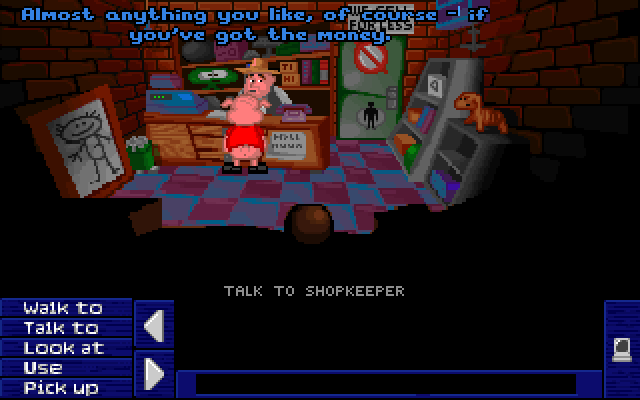
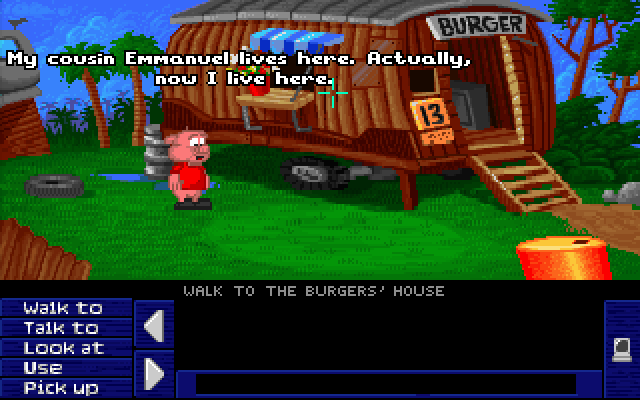
The Mutation of Johnny Burger arrives with the only complete English translation of the game, more games stream with everything they need, and titles with accents get clean web addresses.

Mutation of J.B. in English: every verb, name and line in english
Every verb, name and line in English
Mutation of J.B. in English: english subtitles over the original voices
English subtitles over the original voices
  • Mutation of J.B. (The Mutation of Johnny Burger), the 1996 cartoon adventure about a boy turned into a talking piglet, is playable in English for the first time: every line, item, button and menu translated, with English subtitles over the original voices. It is the only complete English translation of the game, and the Slovak original with its full voice cast is here too.
  • More games stream with everything they need. A game that keeps its CD as a folder now streams with that CD, and a game that also opens its own folder as a floppy or a second drive keeps that drive.
  • Games with accented letters in their title get readable web addresses, and letters like ß, ł and ø are spelled out in every address: collections, rankings, rooms and tags included. Older links to genres or themes with accents lead to the new address.
All 4 changes
  • In the changelog, the loading spinner turns on its ring, and the PRO diamond on the avatar drawing is as large as the badges under it.
v1.3.19

Ranks that mean something, and pages that fit a phone

Levels climb slower and the top ranks now go to the people who write, post and share; the Cloud saves and Custom controls pages read well on a phone; and the homepage holds still once it has opened.

  • Levels come slower, and the top ranks belong to the people who give to the community: reviews, forum posts, uploads and shared controls. Playing, visiting, your library and ratings together earn up to 30 XP a day. Everyone's level was worked out again on the new curve.
  • The Cloud saves and Custom controls pages read well on a phone: their drawings lay their parts out one under another, and the action wheel fills the screen.
  • The featured games at the top of the homepage stay the ones you saw when the page opened. A reload still picks new ones.
All 8 changes
  • The Newsflash rail on the homepage shows each picture whole, plays short clips, and marks videos and albums. Nothing zooms when you point at it.
  • Games in your library wear a dark mark with a blue bookmark on their cover, in place of the white square.
  • In the footer, the link to the page you are on is blue.
  • The changelog shows Newsflash, the modern shooter controls, the bug button and faster streaming in motion.
  • A game that streams picks up changes to its files: its streamed version is built again from the new ones.
v1.3.18

Newsflash: quick news from the retro world

A new wall of short posts with a picture or a clip, read like a channel: react with animated emoji, leave a quick comment, follow it to hear about every new post, and see the newest right on the homepage.

johooDOOM's imps, thirty years onFireballs, pixels and a pistol, and it plays right here.42131.5K · 5:12 PM1 commentJOjohooLara's first outing ran on a 486Tomb Raider asked for 8 MB of memory and a 486 DX4.1111.5K · 5:12 PMBe the first to commentJONewsflash11 posts · 8 followersFollowFollowingREACTAnimated emojiFOLLOWBell on new postsNEW POSTAt the bottomjohooDOOM's imps, thirty years onFireballs, pixels and a pistol, and it plays right here.42131.5K · 5:12 PM1 commentJOjohooLara's first outing ran on a 486Tomb Raider asked for 8 MB of memory and a 486 DX4.1111.5K · 5:12 PMBe the first to commentJONewsflash11 posts · 8 followersFollowFollowing
  • Newsflash is new: short posts with pictures, albums, clips and videos, newest at the bottom, and older ones arrive as you scroll up.
  • React to a post with animated emoji, one reaction each, and see how many people picked which.
  • Leave a quick comment under any post, with the site's emoji.
All 6 changes
  • Follow Newsflash and every new post rings your bell; the menus show how many posts you haven't seen yet.
  • The homepage shows the newest games first, then the latest Newsflash posts, then the genres and what's trending.
  • Turning a page in the catalogue, your library or the wanted list takes you back to the top of the list.
v1.3.16

A clearer About, a smoother controls editor

The About page now shows everything you can do here, and the touch keyboard editor keeps the game moving while you work, tests with your own toggle, and copies a layout from one screen to another in a click.

  • The About page is new: what you can do here at a glance, from playing in the browser and saves that follow you to touch controls, playing together, your library and asking for a game.
  • In the touch keyboard editor the game behind the keys keeps moving instead of freezing after a moment.
  • Test in the keyboard editor now plays like the game: the keyboard button puts the keys over the game, under it or away, and your real keyboard and gamepad work while you test.
All 6 changes
  • A tablet or phone layout with no keys yet offers to copy the desktop one, and a right-click on the editor's canvas copies keys from any other screen.
  • View all in the notifications menu closes the menu as it opens your notifications.
  • The status page names each service by what it does for you.
v1.3.15

Featured art, framed

The pictures behind the featured games on the homepage are now cut to the exact shape of their frame, so the game's art shows whole and sharp.

  • The featured games at the top of the homepage show their art cut to the frame's own shape, sharp on high-resolution screens, instead of an image cropped by the page.
v1.3.14

A steadier game page

The streaming card beside Play keeps its size while it checks what is on your device, so a game's page no longer jumps as it loads.

  • A game's page holds still while it loads: the streaming card keeps the same size before and after it has checked what is on your device.
  • Once a game is fully on your device, the card says so and leads to your downloaded games.
v1.3.13

Series and trails, tidied

Games from the archive are filed under their series name alone, breadcrumbs stay on one line, and the Custom controls banner on Pricing shows the game at full size.

  • Doom, Quake, Blood, Heretic and Hexen, Duke Nukem and the rest are filed under their series name alone, not a list of sound cards and themes, so their series pages and the series card on each game read right.
  • Breadcrumbs stay on one line on every page: a long title ends in an ellipsis instead of wrapping.
  • On the pricing page the Custom controls banner shows the game at its full height, with a button to the feature page.
v1.3.12

Classic shooters, modern controls

Duke Nukem 3D, Blood, Shadow Warrior, Quake, Doom, Hexen and their kin now start with W A S D and mouse aim, and the touch keyboard and gamepad match.

W · walk forwardA D · step asideMouse · aim, forward looks upClick or F · fireSpace · jumpE · useQWFWDWFWDEUSEEUSEALEFTALEFTSBACKDRIGHTDRIGHTFFIREFFIRECtrlSpaceJUMPSpaceJUMPW · walk forwardA D · step asideMouse · aim, forward looks upClick or F · fireSpace · jumpE · useQWFWDWFWDEUSEEUSEALEFTALEFTSBACKDRIGHTDRIGHTFFIREFFIRECtrlSpaceJUMPSpaceJUMP
  • Build, Quake and Doom engine games start with W A S D, mouse aim with the mouse pushed forward looking up, left click or F to fire, E to use and Space to jump. Nothing needs Ctrl or Alt, so Ctrl + W no longer closes the tab mid-fight.
  • Their Controls tab, on-screen keyboard and gamepad follow the new keys. On a gamepad the left stick walks and strafes, the right stick aims.
  • Duke Nukem 3D, Blood and Shadow Warrior no longer flicker: they run at 800 × 600, a size the player's graphics card can show without tearing.
All 8 changes
  • Picking the Gravis Ultrasound in a game's sound menu works instead of stopping the game.
  • A community feed line about several games added to a library leads to that player's profile, when it is public.
  • The name on a profile sits right under its join date again.
  • PRO is three marks now: a gold PRO after the name while you are a member, the PRO badge beside your rank for good once you have paid, and the diamond on your avatar on the yearly plan, for as long as it runs.
  • In the forum the PRO badge sits under your rank, the same size as it, and the gold PRO after your name. The diamond in the account menu holds still.
v1.3.11

A blog that reads better

Blog posts are set like a magazine — a centred headline, a wide cover, a narrower column of text — and the latest posts now show on the homepage.

  • Posts have a centred headline with the byline and share buttons under it, a wider cover and a narrower column of text that is easier to read.
  • Share a post from beside its byline or from the bar at its foot, now with X and Reddit icons.
  • The homepage has a rail of the latest blog posts above the about section.
All 7 changes
  • Related posts under an article scroll sideways instead of wrapping into rows.
  • Opening a post shows a placeholder shaped like the post, not the blog's grid of tiles.
  • A back button sits at the right of the breadcrumbs on every post.
  • The arrows on every rail fade out at its ends.
v1.3.10

Cloud saves, shown

A new Cloud saves page shows a save made on one device carrying on from the same moment on another, and the Custom controls page got a cleaner design.

Saved in cloudThis computerLoaded · slot 2Your phoneSaved in cloudThis computerLoaded · slot 2Your phone
Follows you to every device
FREE1 slotE1M1 · Hangar3 days ago1PRO7 slotsE1M1 · Hangar3 days ago1E1M2 · Nuclear Plant2 days ago2E1M3 · Toxin Refineryyesterday3E1M4 · Command Control5 hours ago4E1M5 · Phobos Lab2 hours ago5E1M6 · Central Processing40 min ago6E1M7 · Computer Stationjust now7FREE1 slotE1M1 · Hangar3 days ago1PRO7 slotsE1M1 · Hangar3 days ago1E1M2 · Nuclear Plant2 days ago2E1M3 · Toxin Refineryyesterday3E1M4 · Command Control5 hours ago4E1M5 · Phobos Lab2 hours ago5E1M6 · Central Processing40 min ago6E1M7 · Computer Stationjust now7
7 slots a game
YOUR SAVESDOOME1M3 · 2 hours agoSlot 1Tomb RaiderThe Caves · importedSlot 2ExportImportYour filesdoom-slot1tomb-raiderYOUR SAVESDOOME1M3 · 2 hours agoSlot 1Tomb RaiderThe Caves · importedSlot 2ExportImportYour filesdoom-slot1tomb-raider
Out to a file and back
  • The new Cloud saves page shows what PRO does for your saves: they sync to every device, seven slots a game, safe when the browser is cleared, and out to a file and back.
  • The Custom controls page is redesigned, with the action wheel and every touch gesture drawn and moving.
  • Pricing links each saves and controls perk to its page, and both pages are in the footer.
All 5 changes
  • The roadmap is up to date: custom controls shipped, ready-made controls for every game come next.
  • The drawings across PRO pages are quieter and more compact, with labels that sit evenly in their boxes.
v1.3.9

Custom controls

Make your own touch keyboard and gamepad mapping for any game, try it in the game before you save, and share it with one press.

Keyboard editorSaved · to your controlsUnsaved changes · to your controlsAddTestSaveSave44 pxLAYERSMain4Grid · Actions · 4 × 2100%MoveActionsCtrlAltEscSpaceAdd a keyPick one key, or switch to Combination.Search keys…LettersModifiersNavigationNumbersCtrlAltShiftSpaceTabEscEnterBackspaceCapsCancelAdd keyTesting the keysBack to editing
Gamepad editorPlug in a controller and press a button
LTRTLBRBABXY
  • Custom controls come with PRO: your own on-screen keyboard and controller mapping for any game, shown on the new Custom controls page.
  • PRO members wear a blue diamond on their avatar — it turns now and then and spills a little pixel glitter — and PRO after their name.
  • Test plays the game with your keys as they are, before you save.
All 12 changes
  • Share your controls right after saving, from the game. Players vote with a heart.
  • Right-click the keyboard editor for a new grid, a preset or a layer. The editors have new, clearer icons.
  • The gamepad editor draws a controller that looks like the real one.
  • Two fingers spread on the game draw a selection box, and the player's Settings list every touch gesture.
  • The pricing page shows what PRO adds, each perk drawn and moving.
  • The changelog got shorter: a sentence, the new thing itself in motion, three highlights.
  • Unread notifications turn the bell blue and ring it now and then, instead of a number.
  • The keyboard editor no longer weighs on the game while it is open, Firefox included.
  • Your account menu shows your rank and level more clearly; forum posts show the rank smaller under the avatar.
v1.3.8

Tidier profiles and a clearer forum

Profiles and your dashboard sit lower and fit long names, forum posts show who wrote them more clearly, and ranks sit properly centred.

  • Your profile and dashboard banner is lower: the buttons sit at the top right, your level and badges are small print beside the date you joined, and a long name fits on one line. Hover a badge such as Archivist to see what earned it.
  • The rank card beside your profile is more compact, with the way to the next level and the next rank on one line.
  • In the forum, names are bigger, the rank under each avatar is larger and stands on its own, and the one who started the thread is marked Author under it.
All 7 changes
  • Replying in the forum shows your own picture beside the box.
  • Avatars without a picture are a plain dark grey, and the online dot is smaller.
  • Ranks look centred on their tiles: each one is placed by where its weight sits, so a General's three stars no longer ride high.
  • The welcome line on your dashboard stays on one line, and a long name no longer stretches the header.
v1.3.7

Bigger avatars, a cleaner forum and where to buy

Avatars are bigger and wear their marks in the corners, the forum is calmer and easier to find your way back in, game pages say where a game is sold today, and news posts always come with a picture.

TOP RIGHTOnline nowTOP LEFTPRO memberBOTTOM RIGHTThe teamBOTTOM LEFTRankAL
  • Avatars are bigger everywhere, and the ones without a picture are a quiet dark grey. Each corner means one thing: the PRO star top left, online top right, the team's crown or shield bottom right, and on profiles your rank bottom left.
  • Ranks stand on a dark hexagon, under your avatar in the forum and on your profile, where your rank card now sits in a frame of its own. The rank's name is on your profile only, so posts and reviews stay uncluttered.
  • In a forum thread, a back button sits at the top, the one who started the thread is marked Author, and boards and threads darken softly under the pointer instead of lighting up.
All 7 changes
  • A game page shows where the game is sold today, GOG and Steam among them, in a Where to buy box. News posts about one game get the same box.
  • Every news post comes with a cover picture, and a screenshot from the archive when the story is about a game you can play here.
  • On a phone the catalogue's Browse by rows fit the screen: what does not fit folds into a … menu. On a small tablet the filter and sort buttons line up the way they do on a phone.
  • Opening a menu no longer makes the sidebar's scrollbar blink, and a button you clicked no longer keeps an outline after its menu closes.
v1.3.6

Ranks with insignia, forum rooms and game news

Everyone wears a rank beside their name now, the forum opens with rooms for every kind of talk, the blog brings game news from around the web, and streamed games no longer get stuck after an uninstall.

Private First ClassPrivate First ClassLevel 3RecruitPrivatePrivate First ClassLance CorporalCorporalSergeantStaff Sergeant
  • Ranks you can see: an insignia under your avatar in the forum and beside your name in reviews, on your profile and on the leaderboard. Twenty-five ranks from Recruit to General of the Archive come with XP, and the first ones arrive within days.
  • The team can also give ranks by hand: honours, expert and contest ranks, and a few anti-ranks for the ones who earned those. PRO members wear a PRO badge as well. Every rank is on the new Ranks page.
  • The forum has rooms for introductions, news, bug reports, general talk, game help, multiplayer, setup and hardware, mods and fan projects, and off-topic.
All 9 changes
  • The blog brings game news from around the web, old and new, written up for the site with a link to where each story came from.
  • A streamed game that was open in another tab while you uninstalled or updated it no longer hangs on Preparing game files. Uninstalling one that is open elsewhere tells you to close that tab first.
  • Installed games shows the right size of streamed games in every browser, Firefox included.
  • Games whose installer looks for an empty folder, Discworld among them, start the game instead of the installer.
  • A game that is not playable yet says so clearly, and asking for a playable version is one bright button. The bug button is a bigger beetle, and reporting a problem uses switches that stay put.
  • On a phone the header shows the PRO badge, and a small NEW tag beside the logo points to what changed in the latest release.
v1.3.5

A bug button you can find

The button for reporting a game that doesn't work stands out on every game page, and the FAQ says how to use it.

Play in browser+ Add to libraryInstall game7.1 MBManage savesYou're the first!1Report sent: you hear back when it is fixedSomething not working? Report a bugREPORT A PROBLEMDoom IIGame does not start or crashesSound is wrongPicture is wrongSound is wrongNo music after the intro, only the soundeffects. Same in Chrome and Firefox.CancelSend reportPlay in browser+ Add to libraryInstall game7.1 MBManage savesYou're the first!1Report sent: you hear back when it is fixedSomething not working? Report a bugREPORT A PROBLEMDoom IIGame does not start or crashesSound is wrongPicture is wrongSound is wrongNo music after the intro, only the soundeffects. Same in Chrome and Firefox.CancelSend report
  • The bug button beside Like on a game's page is gold now, with a clearer beetle on it, so it reads as something to press rather than decoration. Hover it and it says what it is for; once your report is in it turns into a green tick.
  • The Frequently asked section on the pricing page explains how to report a game that doesn't work, and that you hear back when it is fixed.
v1.3.4

Streamed games start in seconds

Big games that stream start three to four times sooner, their CDs come along when the game downloads for offline play, and games that remember where they were installed start again.

BEFORE · ONE BY ONEReady in 16 sNOW · MANY AT ONCEReady in 5 sBEFORE · ONE BY ONEReady in 16 sNOW · MANY AT ONCEReady in 5 s
  • Big games that stream are ready much sooner: what a game needs before its first screen now arrives many pieces at a time instead of one after another. Constructor went from about 16 seconds to under 5 in Chrome, and from 19 to 5 in Firefox.
  • A streamed game's CD is now part of the background download and of Download all. Before, it was left out, so the game could not play its CD offline.
  • Games that wrote their install folder into their own settings start again instead of quitting right after their menu. Constructor was one of them.
v1.3.3

Series, a bug button on every game, and controls laid out for two thumbs

A game's page lists the other entries of its series, anything wrong with a game is one click to report, the on-screen keyboard and gamepad follow the conventions thumbs expect, and the membership goes by PRO.

  • Games come in series: a game's page lists the other entries you can play here, in order, and every series has a page of its own in the catalogue (Catalog → Series). Sequels file themselves as they arrive.
  • Found something wrong with a game? Signed in, the bug button beside Like on its page sends a report: wrong game, no sound, a broken picture, wrong on-screen keys or gamepad mapping, missing gamepad support, or anything else. You hear back in your notifications when it is fixed or answered.
  • The on-screen keyboard is laid out for two thumbs: the stick on the left with Esc tucked in the corner above it, the game's main actions under the right thumb (a jump first, then fire, then use), the switches to the other layers above them with a row to spare, and Enter in the middle only when the game asks for it. Keys are half as big again on a tablet.
All 8 changes
  • Gamepads follow the same conventions: jump on A, fire on the trigger of a shooter and on X elsewhere, run held on the left trigger, a map on Y, and the extra keys on a wheel that names them in full. Nothing on a pad can quit the game.
  • The Controls tab says what the players' section is for: touch and gamepad controls made by players for the browser player, as opposed to the real keys above.
  • Games that support the Roland MT-32 get it switched on by themselves when their build arrives, so more games play with their best music.
  • The membership goes by PRO: Go PRO in the header, PRO on the pricing page. The plan itself is still called Supporter, which is the name on the invoice.
  • Saving in a game shows one message instead of two.
v1.3.2

Covers that come alive, and controls made by players

Rest the pointer on a game's cover and it plays a few seconds of the game, and every game can get on-screen controls made by its players.

  • Rest the pointer on a cover, or hold it with a finger, and the card plays a few seconds of the game. A quick sweep across the grid starts nothing.
  • Make your own controls: build an on-screen keyboard or a gamepad map for a game right in the game, in three steps, and share it. Players vote, pick the one they play with, and the best become the game's own. Sharing earns XP.
  • More games start: every game gets 618 KB of free memory, so games that said "Insufficient memory", Dune II with MT-32 music among them, now run.
v1.3.1

A clearer library, categories one click away, and a keyboard for thumbs

Your library has one plain button on every game, the catalogue opens with its categories, a game's categories lead somewhere, and the on-screen keyboard is laid out like a gamepad.

  • One library button on a game's page: Add to library, then Playing, Want to play, On hold or Completed, each with a line saying what it means. The library has a tab for each, and Remove is in the same menu.
  • Browse by category: the catalogue opens with a row of categories (genre, perspective, gameplay, setting, theme, pacing, art style) and their biggest picks, and the Catalog menu in the header lists them too.
  • A game's categories are grouped by kind, and every one leads to the games that share it, instead of a heap of tags that led nowhere.
All 10 changes
  • Jump back in fits a phone: a title gets two lines instead of an ellipsis, and the row always fills, four across, three and three on a tablet, two and two on a phone.
  • The activity feed stays readable: games added together are one line, clicking a shelf back and forth no longer pushes it to the top, and no single member can fill the feed.
  • New accounts are named after the Google profile, the first name and an initial with a matching @handle, instead of a generated nickname. Both can be changed in Settings.
  • A game released in several languages or editions is one title, with a picker beside Play.
  • The on-screen keyboard is built for thumbs and laid out like a gamepad: the keys a game uses most are the biggest, and letters and numbers are always at hand.
  • Games run faster where the browser allows it, start sooner, and the ones asking for 1024×768 or 1280×1024 now start too. A streamed game says when an update is ready and keeps its loader up until the drive is there.
  • Pictures show the moment they arrive, slide-out panels close with a drag, search finds every title, and after an update nobody is left on an old version of a page.
v1.3.0

A tidier settings panel, and saves that survive closing the tab

The settings panel folds into sections, the download indicator moves out of the way, and a save made just before you close the tab is kept.

  • The settings panel folds: each section is a heading, one opens at a time, and the small print is bigger and shorter.
  • While a streamed game finishes downloading, a small indicator sits in the top corner instead of a card over the controls.
  • A save made just before you close the tab is kept: the page waits until the upload has finished.
All 4 changes
  • The on-screen keyboard under the game is as tall as its keys: rearranging it no longer leaves an empty band.
v1.2.3

Fullscreen on a phone, and updates that keep your installs

Fullscreen works on an iPhone, installed games stay playable offline across an update, and game pages leave out what a title does not have.

  • Fullscreen works on an iPhone: the game fills the screen, and the same button brings it back.
  • Installed games stay playable offline across an update, and a game you played before starts with the current version of the player.
  • A game page leaves out the facts a title does not have, rather than printing placeholders for them.
All 4 changes
  • The featured banners on the homepage sit in a section of their own and no longer overlap in Chrome.
v1.2.2

Tidier, and ready to open the doors

A clean-up round before launch: a calmer inbox, pages that fit a phone, save files you can take with you, and a few things put back where they belong.

  • The inbox reads cleaner: larger icons, unread rows marked with a plain bar instead of a badge on every chip, and nothing pulsing.
  • The catalogue and the other list pages fill a phone's width properly — the sort and filter controls share the row instead of leaving a gap.
  • The Wanted page shows two titles side by side on a phone and lists the queue as a compact table with covers, rather than a wide grid that had to be scrolled sideways.
All 13 changes
  • A game page on a phone starts with the title. The chip row above it and the catalogue id are kept for wider screens.
  • Writing a review: a roomier composer, and inserting a link is a small panel next to the toolbar rather than a second dialog. External links open in a new tab and carry nofollow as a matter of course.
  • Admins get their editors back on the play page: the file browser, the keyboard-layout and the gamepad mappers open over the running DOS game from the same rail everyone else sees, with the DOS player's own icons and tooltips.
  • Signing in with a second Google account works: the account chooser opens every time. The separate sign-up page is gone — an account is created by the first sign-in.
  • Lobbies can be searched, narrowed by seats (live now, seats free, waiting for a host) and sorted by players or activity.
  • Cloud saves: a slot exports to a file and imports from one with a button on its row, and a title's slots download together as a ZIP from the dashboard. Poking a friend now plays the poke for you too.
  • Installed games show how much of each title is really on this device — size, share and a bar — for streamed and local builds alike.
  • The year, genre and publisher above a game's title are links to their catalogue pages.
  • A page that does not exist shows the site's own not-found page, marked for search engines to skip, and pages no longer slide in on navigation — they simply appear.
  • The privacy policy and the terms say what the site actually does today, and the contact address on every legal page is written so that it cannot be harvested from the page source.
v1.2.1

Saves that follow you

Your cloud saves follow you to a new browser, and the Players panel in a room is easier to use.

  • Cloud saves follow you to a new browser: the first launch on a fresh device pulls your slot from the cloud instead of starting empty.
  • The Players panel in a room has a proper Copy invite link button, a clearer connection section, and gives the keyboard back to the game the moment it closes. An invite link sent to a friend who is signed out brings them to the room after they sign in.
  • The loading screen is lighter on a phone.
v1.2.0

Checked before you install

The game page checks your browser's storage before an install starts, loading screens say a word about the game, and on a phone the player's actions fold into one compact bar.

  • The game page checks your browser's storage before an install starts and says up front whether the title will fit.
  • Loading screens show a line or two about the game while it boots.
  • On a phone the player's actions fold into one compact bar.
v1.0.6

A ranking you can check, and a roadmap you can hold us to

The Best DOS Games list is now computed from real reviews and real play time, memberships can go live properly, and the roadmap says exactly what we're building next.

  • The Best DOS Games ranking is measured, not chosen. Each title's score comes from member reviews, weighted by how many there are, with a small nudge from how much people actually play it — and every row shows the reviews, players and hours behind its number, so you can check the order rather than trust it.
  • The roadmap has been rewritten in plain language. Everything under “Live now” is something you can go and use today, and what we're building next is spelled out: faster emulation, proper 3dfx Voodoo support, cleaner sound, an on-screen keyboard for every game, and gamepad support wherever a game was built for one.
  • Supporter memberships and one-off contributions can now be switched on end to end, with a check that verifies the payment setup before anyone is asked to pay.
All 7 changes
  • New notifications for the games you care about: when a title in your library is published or its playable build is rebuilt, you hear about it live. There's a switch for it in your notification settings, and a Games tab in your inbox.
  • Ranks got a rewrite. The ladder now climbs the way DOS knowledge actually did — from Floppy Swapper through CONFIG.SYS Conjurer and 640K Liberator to MT-32 Maestro — and more of what you do on the site earns XP: rating a game, backing one in the queue, opening a room, making a friend, and having your collection liked.
  • Loading placeholders finally match the page that replaces them, so the catalog and your library stop growing under the cursor a second after they appear. The homepage got one too.
  • Every public string on the site, and the title and description templates search engines see, can now be rewritten from one screen — so the same engine can run an entirely different archive.
v1.0.5

Know what runs before you press play

Every playable title now says how well it actually runs, discs switch from the player's sidebar, and the guard that was catching people who browse quickly has been taught the difference.

  • Playable games carry a compatibility rating in their Specs: fully playable, playable, barely playable, or a straight warning when it isn't. Where there's a known problem, the page says what it is and whether anyone is working on it.
  • Multi-disc games got their own button in the player's sidebar, with a badge showing which disc is currently in the drive. No more hunting through Settings when the game asks for disc 2.
  • The save-slots panel fits a phone properly — one readable row per slot instead of a table that spilled off the screen.
All 6 changes
  • Browsing fast no longer looks like scraping. The anti-bot guard now targets scripts rather than people, and on the rare occasion it does step in, the page tells you exactly how long it will be.
  • Streamed games can pull the whole title down in the background while you play, with visible progress, so a replay starts instantly and works offline.
  • Game write-ups are being reworked to read like someone actually played the game: what the first few minutes are like, what still holds up, and what plainly doesn't.
v1.0.4

Swap the disc without leaving the game

Multi-CD titles change discs mid-game — streamed ones included — plus screenshots and clips straight from the player, and a catalog that remembers how you like to browse.

  • Multi-disc games can swap discs while you play. Open Settings in the player, pick the disc the game is asking for, and carry on — no reload, no reinstall.
  • Disc swapping works on streamed titles too: the big CD-era games stream every disc instead of downloading the whole set up front, and installing one for offline play now fetches all of its discs.
  • Capture what's on screen without leaving the game — a screenshot, or a short clip of the last few seconds of play.
All 6 changes
  • Spoilers stay hidden until you ask for them. Marked-up passages in articles, reviews and forum posts now reveal on click, everywhere.
  • The catalog remembers how you browse — grid or list, your sort, your status filter — per browser, without ever remembering what you searched for.
  • “Now playing” shows one entry per player instead of stacking up a row per session.
v1.0.3

Membership, and a better place to read

Supporter memberships open up, saves get an upload queue you can see, and articles and reviews finally read like articles and reviews.

Saved in cloudThis computerLoaded · slot 2Your phoneSaved in cloudThis computerLoaded · slot 2Your phone
Follows you to every device
FREE1 slotE1M1 · Hangar3 days ago1PRO7 slotsE1M1 · Hangar3 days ago1E1M2 · Nuclear Plant2 days ago2E1M3 · Toxin Refineryyesterday3E1M4 · Command Control5 hours ago4E1M5 · Phobos Lab2 hours ago5E1M6 · Central Processing40 min ago6E1M7 · Computer Stationjust now7FREE1 slotE1M1 · Hangar3 days ago1PRO7 slotsE1M1 · Hangar3 days ago1E1M2 · Nuclear Plant2 days ago2E1M3 · Toxin Refineryyesterday3E1M4 · Command Control5 hours ago4E1M5 · Phobos Lab2 hours ago5E1M6 · Central Processing40 min ago6E1M7 · Computer Stationjust now7
7 slots a game
YOUR SAVESDOOME1M3 · 2 hours agoSlot 1Tomb RaiderThe Caves · importedSlot 2ExportImportYour filesdoom-slot1tomb-raiderYOUR SAVESDOOME1M3 · 2 hours agoSlot 1Tomb RaiderThe Caves · importedSlot 2ExportImportYour filesdoom-slot1tomb-raider
Out to a file and back
  • Supporter membership arrives: no ads anywhere, cloud saves that follow you between devices, more save slots per game, and import / export of your saves as files.
  • Every game stays free. Free accounts keep their progress in the browser — one slot per game — and see ads; the pricing page now says exactly that, with a plain comparison of what changes.
  • Stop paying and nothing is deleted. Your stored saves stay put, remain downloadable, and come straight back if you subscribe again.
All 12 changes
  • Cloud saves gained a visible queue: saves made offline are listed by game and slot, with one click to upload them all.
  • Conflicts explain themselves. When a slot differs between this browser and your account, the page says which copy is newer and offers a straight choice instead of jargon.
  • The emulator now tells the truth about where a save went — “Saved in browser” when it stayed on your device, “Saved in cloud” only when it really synced.
  • Reviews can be written properly: headings, lists, quotes and links, all styled the same way articles are.
  • Articles read better — a wider column, real bullets and numbering, generous spacing between list items, and pull quotes set in a serif face that actually looks like a quote.
  • Images in articles can be placed: inline, centred, floated left or right with text wrapping, column width, or full width.
  • Every game page now ends with a call to action — play it if there's a build, or ask for one if there isn't.
  • Breadcrumbs are easier to hit and easier to read.
  • Move a game to a shelf from its page — Playing, Paused, Completed or Wishlist — so the library filters finally have something to filter.
v1.0.2

Installing, browsing, and your own numbers

Clearer installs, a catalog that keeps up with itself, and profile stats that mean what they say.

  • Choose where a game installs — pick your storage before the download starts, and watch quieter, clearer progress while it runs.
  • Newly published titles show up in the catalog straight away instead of on a delay.
  • Sorting says what it does: “Recently added” orders by when a title joined the archive, “Release year” by when it came out, and “Most viewed” now genuinely ranks by views.
All 12 changes
  • Playtime counts only the time you're actually in the game, so the hours on your profile match the sessions you played.
  • Reset your play statistics whenever you like, from the dashboard. Library, saves, reviews and XP stay untouched.
  • Your dashboard activity now covers what you actually do here — sessions played, forum replies, collections and level-ups, not just library changes.
  • Pick your own public handle in settings — it sets your profile address and how people mention you.
  • Room invites, knocks and mentions now follow your notification settings.
  • Profiles and community feeds list published titles only.
  • Opening a menu no longer nudges the page sideways.
  • On phones, returning to a game keeps the player's top bar where it belongs.
  • The copyright and takedown pages rewritten in plain language, with one contact address that reaches us.
v1.0.1

Saves you can trust

A fix round focused on save states — especially for the big streamed titles — plus a cleaner saves dashboard and a smoother status page.

  • Saving now works reliably in streamed heavyweights — progress in big CD-era titles persists across sessions and syncs to the cloud like everywhere else.
  • The game tells you where your progress loaded from — cloud or this device — every time you launch.
  • Cloud saves dashboard redesigned: one tidy row per game with a sync status at a glance, and every action in one place — much friendlier on phones.
All 7 changes
  • Saves that never made it to the cloud (offline play, failed sync) are now visible per game, with one-click manual sync.
  • Deleting a save from the dashboard now sticks — it no longer reappears on your next launch.
  • Cleaner touch play — removed the leftover on-screen buttons that could appear over games on phones; our own touch controls remain.
  • Status page charts redrawn: steady, readable latency lines that no longer drift or smudge.
v1.0.0

dos.games 1.0

The first stable release. Everything below has been live for a while and battle-tested — 1.0 marks the point where the whole platform holds together: browse, play, save, meet people, come back.

  • Play in the browser — preserved titles boot straight into our DOSBox build, with gamepad support, a virtual keyboard on touch screens and per-game tuning.
  • Multiplayer lobbies — host or join IPX-over-WebRTC sessions with an in-game player list, chat feed and live connection stats.
  • Cloud saves — save states follow you across devices, with slot history and one-click restore.
All 7 changes
  • Streamed heavyweights — big CD-era titles stream from the server as you play instead of downloading gigabytes up front.
  • 3Dfx and Roland MT-32 — Glide-accelerated releases and authentic MT-32 music where a game supports them.
  • Soundtracks — original game music, tracker and chiptune formats included, in a site-wide floating player.
  • Community — forums, reviews backed by real recorded playtime, XP levels, a cheats database, manuals and trailers.
The road to 1.03 months

July 2026

  • Multiplayer grew its in-game layer: player join/leave toasts, a chat feed, link-quality stats, and sessions that survive a backgrounded tab.
  • The catalog grows in bulk now — preservation imports land complete with metadata, covers, screenshots, manuals and soundtracks.
  • Live status page with realtime latency charts for every backing service.

June 2026

  • One emulator core: DOSBox-X with 3Dfx (Glide) bundles, worker-thread boot and MT-32 ROM support.
  • Streamed builds for heavy titles — sector streaming instead of full downloads.
  • Supporter memberships, pricing and the supporters wall.
  • A curated homepage hero with rotating showcases.

May 2026

  • dos.games opens: the catalog, browser play, the install flow and the design system.
  • Multiplayer rooms and the lobby directory arrive, on self-hosted signaling.
  • Cloud saves ship end-to-end, with a dashboard and per-device auto-sync.
  • Forums with a rich-text editor, XP levels, the cheats database and browse-by-taxonomy pages.
  • Soundtrack albums with the floating music player.
Next

Everything we haven't built yet is on the roadmap.