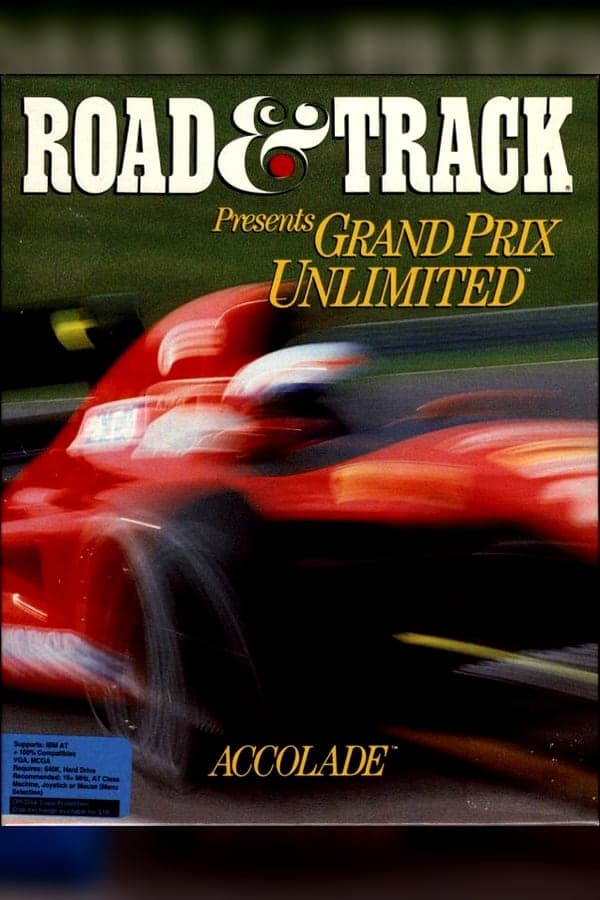
Accolade's 1992 MS-DOS game Grand Prix Unlimited offered players complete custom control over Formula One racing, right down to designing their own tracks, but it came attached to a physics engine that turned every bad corner into a giant fireball explosion.
Fire up the car, set your driver horizon view height to suit your taste, and the game puts you right in the cockpit of early nineties Formula One. Developed and published by Accolade, Inc. in partnership with Road & Track magazine, the simulator gives you five licensed teams to drive for: Williams-Renault, McLaren-Honda, Ferrari, Tyrrell, and Benetton-Ford. Before you hit the tarmac at Monza, Monaco, or Spa-Francorchamps, you spend time in the menus adjusting gear ratios, wing angles, steering radius, brake response, and tire compounds to match the forecast.
Once you roll out of the pits, the game demands absolute precision. Managing tire wear across full multi-lap sessions, timing your pit stops, and qualifying on a clear lap to grab pole position are all necessary if you want to win a World Championship. If the harsh steering feels too brutal during your first few laps, Accolade included a lane control assistance option that gently guides your nose away from the grass, though relying on it feels like driving with training wheels on a 700-horsepower engine.
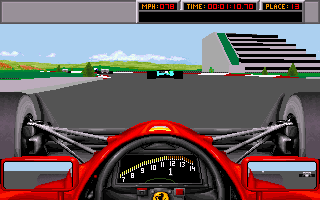
To build this title, designer Tom Loughry repurposed the 3D engine previously written for Test Drive 3. While that technology worked well enough for leisure cruises through countryside scenery, stuffing open-wheel racing cars into it created odd technical headaches. The visual presentation relied on filled polygon shapes that looked clean on a 386 processor in 1992, supported by lush Roland MT-32 synth music in the menus, even if the engine sound effects themselves sounded like a buzzing electric shaver.
The real issue with adapting that technology to racing games of this speed was how tightly the internal physics code tied itself to CPU clock rates. On modern hardware or fast DOSBox setups, the game runs at ludicrous speeds unless you throttle the cycles down significantly. Without CPU slowdown utilities, a minor nudge against a kerb launches your Tyrrell into orbit or instantly detonates your car in a massive, comical fireball before you can even react to the turn.
What set this release apart from contemporaries like Geoff Crammond's World Circuit was its built-in course designer. It was one of the earliest F1 titles to hand players a complete construction kit for custom tracks. You build circuits out of modular component tiles, stringing together long straights, sweeping curves, pit lanes, tunnels, bridges, elevation changes, and roadside buildings.
Constructing a functional 3D track with these tools takes patience. The tile interface offers a limited selection of pieces, and estimating elevation and depth from the overhead grid view is notoriously tricky. You will often construct what looks like a sweeping hair-pin corner on the editor map, only to test-drive it in first-person view and realise you built an unnavigable wall of asphalt that sends your car straight into the grandstands.
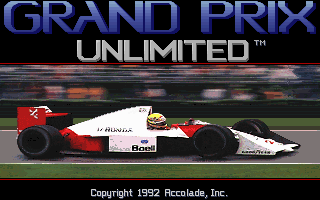
At release, contemporary gaming magazines split down the middle on Accolade's ambitious design. COMPUTE! praised the sheer amount of control given to the player while calling out the terrible engine noises, whereas Computer Gaming World criticized the frustrating execution that hobbled an otherwise clever structure. Historical reviews ranged from glowing high scores in German magazines down to sub-50% verdicts from outlets exasperated by the twitchy controls.
That sensitivity remains the primary roadblock today. The digital keyboard steering has virtually no deadzone or damping, meaning a light tap on the arrow keys turns the front wheels sharply into the barrier. When you combine hyper-sensitive input with unpredictable AI opponents who refuse to yield on the racing line, finishing a full twenty-lap race without a catastrophic collision requires incredible patience and a very specific CPU clock speed configuration.
If you want to experience early polygon open-wheel racing without wrestling with code-wheel physical copy protection prompts or tweaking DOS memory managers, you can play Grand Prix Unlimited free in your browser right now. Everything runs directly inside your web browser window with zero installation required, allowing you to jump straight into practice laps or fire up the circuit designer immediately.
It is well worth a look if you want to see where customizable racing simulators started. Before you step into the championship mode, launch a single race at Montreal, dial down the steering sensitivity in the options menu, and turn on lane control for your first few laps. You will quickly see why this early attempt at total driver freedom left such a distinct mark on nineties PC gaming.
Accolade's 1992 MS-DOS game Grand Prix Unlimited offered players complete custom control over Formula One racing, right down to designing their own tracks, but it came attached to a physics engine that turned every bad corner into a giant fireball explosion.
Fire up the car, set your driver horizon view height to suit your taste, and the game puts you right in the cockpit of early nineties Formula One. Developed and published by Accolade, Inc. in partnership with Road & Track magazine, the simulator gives you five licensed teams to drive for: Williams-Renault, McLaren-Honda, Ferrari, Tyrrell, and Benetton-Ford. Before you hit the tarmac at Monza, Monaco, or Spa-Francorchamps, you spend time in the menus adjusting gear ratios, wing angles, steering radius, brake response, and tire compounds to match the forecast.
Once you roll out of the pits, the game demands absolute precision. Managing tire wear across full multi-lap sessions, timing your pit stops, and qualifying on a clear lap to grab pole position are all necessary if you want to win a World Championship. If the harsh steering feels too brutal during your first few laps, Accolade included a lane control assistance option that gently guides your nose away from the grass, though relying on it feels like driving with training wheels on a 700-horsepower engine.
To build this title, designer Tom Loughry repurposed the 3D engine previously written for Test Drive 3. While that technology worked well enough for leisure cruises through countryside scenery, stuffing open-wheel racing cars into it created odd technical headaches. The visual presentation relied on filled polygon shapes that looked clean on a 386 processor in 1992, supported by lush Roland MT-32 synth music in the menus, even if the engine sound effects themselves sounded like a buzzing electric shaver.
The real issue with adapting that technology to racing games of this speed was how tightly the internal physics code tied itself to CPU clock rates. On modern hardware or fast DOSBox setups, the game runs at ludicrous speeds unless you throttle the cycles down significantly. Without CPU slowdown utilities, a minor nudge against a kerb launches your Tyrrell into orbit or instantly detonates your car in a massive, comical fireball before you can even react to the turn.
What set this release apart from contemporaries like Geoff Crammond's World Circuit was its built-in course designer. It was one of the earliest F1 titles to hand players a complete construction kit for custom tracks. You build circuits out of modular component tiles, stringing together long straights, sweeping curves, pit lanes, tunnels, bridges, elevation changes, and roadside buildings.
Constructing a functional 3D track with these tools takes patience. The tile interface offers a limited selection of pieces, and estimating elevation and depth from the overhead grid view is notoriously tricky. You will often construct what looks like a sweeping hair-pin corner on the editor map, only to test-drive it in first-person view and realise you built an unnavigable wall of asphalt that sends your car straight into the grandstands.
At release, contemporary gaming magazines split down the middle on Accolade's ambitious design. COMPUTE! praised the sheer amount of control given to the player while calling out the terrible engine noises, whereas Computer Gaming World criticized the frustrating execution that hobbled an otherwise clever structure. Historical reviews ranged from glowing high scores in German magazines down to sub-50% verdicts from outlets exasperated by the twitchy controls.
That sensitivity remains the primary roadblock today. The digital keyboard steering has virtually no deadzone or damping, meaning a light tap on the arrow keys turns the front wheels sharply into the barrier. When you combine hyper-sensitive input with unpredictable AI opponents who refuse to yield on the racing line, finishing a full twenty-lap race without a catastrophic collision requires incredible patience and a very specific CPU clock speed configuration.
If you want to experience early polygon open-wheel racing without wrestling with code-wheel physical copy protection prompts or tweaking DOS memory managers, you can play Grand Prix Unlimited free in your browser right now. Everything runs directly inside your web browser window with zero installation required, allowing you to jump straight into practice laps or fire up the circuit designer immediately.
It is well worth a look if you want to see where customizable racing simulators started. Before you step into the championship mode, launch a single race at Montreal, dial down the steering sensitivity in the options menu, and turn on lane control for your first few laps. You will quickly see why this early attempt at total driver freedom left such a distinct mark on nineties PC gaming.
How Grand Prix Unlimited is played — the keys the game listens to, grouped by what they do.
Highlighted keys are mapped — hover or tap one to see what it does.
The game can be re-configured by running SETUP.EXE in its installation directory.
The on-screen keyboard and gamepad mapping the browser player uses on a phone, a tablet or a controller, as opposed to the real keys above. $PRO members make their own in the player and share them here; anyone can pick one to play with.
Cheat codes, console commands and memory pokes for Grand Prix Unlimited — each one verified and attributed.
Sign in to submitHow Grand Prix Unlimited is played — the keys the game listens to, grouped by what they do.
Highlighted keys are mapped — hover or tap one to see what it does.
The game can be re-configured by running SETUP.EXE in its installation directory.
The on-screen keyboard and gamepad mapping the browser player uses on a phone, a tablet or a controller, as opposed to the real keys above. $PRO members make their own in the player and share them here; anyone can pick one to play with.
Cheat codes, console commands and memory pokes for Grand Prix Unlimited — each one verified and attributed.
Sign in to submit