coded by a fourteen-year-old developer in 1992, Ultris: The Ultimate Tetris takes standard tile-matching mechanics and crams both Tetris and Columns variants into a single split-screen head-to-head package.
Two puzzle games in one DOS split-screen layout
Most early puzzle games on PC were content to copy a single arcade or console hit, but this shareware title pairs classic block-stacking with a gem-matching layout named Vertris. Playing the 1992 MS-DOS game gives you direct access to both rule sets, letting two people sit at the same monitor and chase high scores in completely different styles side by side.
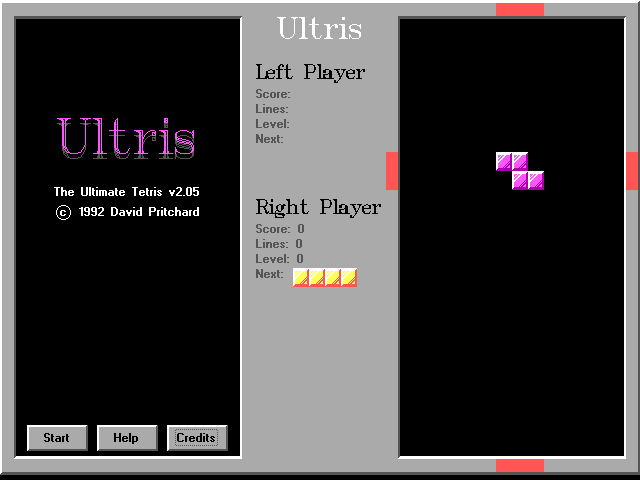
The screen divides vertically down the middle, giving each participant a clean view of their active field in crisp 640x480 EGA graphics. Whether you choose standard Tetris shapes or three-block vertical stacks, the game forces you to plan ahead while pieces drop into place, rewarding fast placement with scaled score bonuses as the difficulty steps up.
Every ten lines cleared raises the speed tier automatically. The drop rate ramps up fast enough that a tidy stack can turn into an untidy pile in a matter of seconds if you lose focus or misjudge a rotation.
How two-player competitive modes disrupt your board
Playing alone works well enough, but the head-to-head modes are where the action gets chaotic. You can set both sides to run identical game types or mix them up so one person plays standard block arrangement while the other handles jewel matching. Ultris: The Ultimate Tetris supports three distinct options for local multi-player:
- Regular play: Both players drop pieces independently in their own wells without affecting the other side.
- Co-operative play: Player piece positions overlap across screens, displaying half-image previews in your partner's view to help coordinate placements.
- Competitive play: Clearing lines actively sabotages your opponent by inserting messy garbage lines or matching pieces into their stack.
In competitive mode, completing a line on your side sends a row of blocks with random gaps directly into the bottom of your rival's field. If you are playing Vertris competitively, completing a match sends the exact same color blocks straight into your opponent's play area, randomly scattered to ruin their carefully prepared vertical setups. It turns a cerebral puzzle game into a frantic race to ruin each other's board state before your own reaches the ceiling.
Accidental speed spikes make precision control tricky
While the feature set was impressive for a homebrew release, the default control mapping carries a frustrating design flaw that every player learns to fear. Steering your falling blocks with the keyboard arrows feels standard until you reach for the Up arrow key, which is hardcoded to instantly raise the game's difficulty level and drop speed.
In the heat of a fast-paced game, an accidental slip of the finger while trying to rotate or align a block sends the game speed skyrocketing ahead of schedule. Suddenly, instead of casually lining up a four-row clear, you are fighting for survival on level eight because your index finger twitched upward for a fraction of a second. It is a harsh punishment for a simple miskey, and one that ruined many promising high-score runs.
Mouse controls and shared keyboards define the experience
Finding room for two pairs of hands on a single 101-key Model M keyboard was always a squeeze in the DOS era. To get around this physical space problem, developer David Pritchard added native mouse support for the second player. One person stays on the arrow keys while the other glides their mouse across a pad to direct, flip, and drop incoming pieces.
Mouse control in a tile puzzle takes some getting used to, but it avoids the ghostly key-jamming issues that plagued budget keyboards when too many buttons were pressed at once. This flexibility helped make the shareware release a popular fixture on home PCs where joysticks were rare and multiplayer options were usually limited to turn-based games.
Looking back at the action puzzle genre from that period, this title offers a surprisingly complete set of features built by a solitary teenage programmer. It skips flashy cutscenes or digital sound effects, focusing entirely on responsive movement, clean layout rendering, and customizable game types that keep two players locked in close matches.
Play Ultris: The Ultimate Tetris right now in your browser
If you want to test your line-clearing reflexes without digging out ancient hardware, you can play Ultris: The Ultimate Tetris online, free, right here in your browser, with nothing to install and no setup required. The mouse controls and split-screen competition respond instantly in a modern browser tab, letting you experience this rare piece of shareware history in seconds. Grab a second player, set your mode, and try not to hit that Up key by mistake.