

Mario Teaches Sums trades jump buttons and fire flowers for simple point-and-click math puzzles aimed straight at toddlers.
Boot up this 1993 MS-DOS game and you will not find any Goombas to stomp or Bowser castles to invade. Instead, Mario Teaches Sums drops you onto an island map where clicking a location sends Mario, Princess Peach, or Yoshi into a brief, spoken arithmetic exercise. Developed by The Software Toolworks and published by Mindscape, the software replaces platforming momentum with basic counting, shape identification, and simple addition. If you came expecting the tight physics of a standard Mushroom Kingdom adventure, watching Mario stand patiently while a digitized voice asks you to point at three apples is quite a shift.
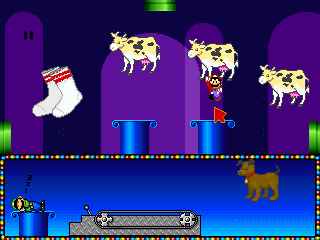
Every mini-game revolves around immediate audio feedback. In activities like Number's World, the game reads out every instruction, number, and displayed word out loud, making it usable for early learners who cannot read yet. You point the mouse cursor at the correct group of items or the matching digit, click, and receive a cheery voice confirmation before moving to the next set. There are no secret exits, no time limits, and zero penalty for picking the wrong answer, which keeps the experience stress-free for tiny kids while leaving older players with very little to actually manage.
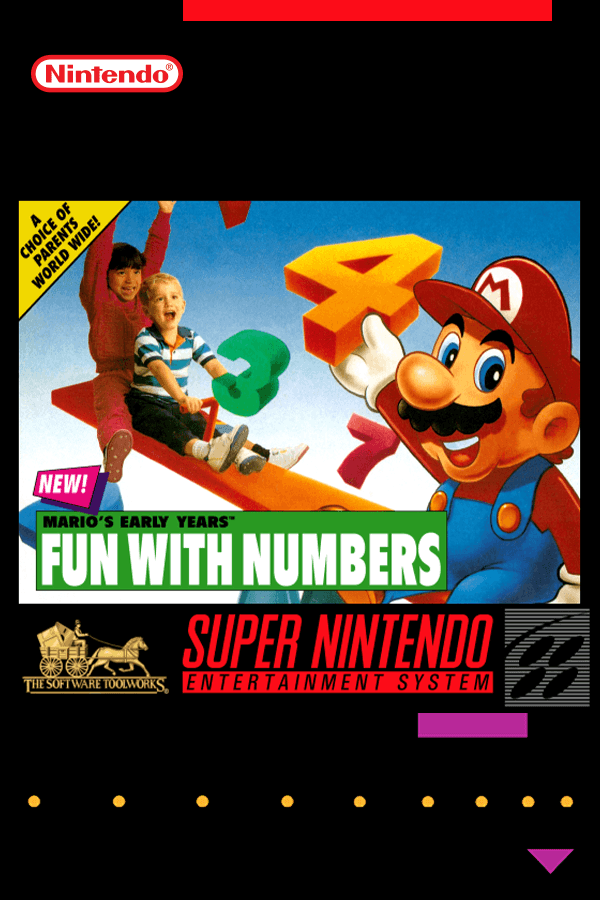
The total lack of platforming was completely by design. The developers brought in child development specialists, educational researchers, and speech language teachers to build an interactive tool specifically tailored for pre-school learning. Across North America, the software originally shipped under the title Mario's Early Years! Fun with Numbers. When it crossed the Atlantic for its European release, the publisher rebranded it to cash in on the name recognition of their earlier typing tutor, creating a loose educational series alongside its sister title, Mario Teaches Words.
Because it targeted three-year-olds, the core design stripped away everything that could cause frustration. You will search in vain for high scores, inventory items, or game-over screens. While that approach made it genuinely useful for teaching early counting, retro software commentators on sites like The Cutting Room Floor have noted how bare the package feels when viewed as a standard video game. It is a set of digital flashcards wearing a Nintendo skin, designed to keep a toddler occupied at a desktop computer for twenty minutes.
Audio drives the entire package, which makes the technical quirks of its PC release glaringly obvious. Because voice clips guide the child through every screen, compatible sound hardware was mandatory to get any real value out of it. Hearing clear speech through a standard PC speaker in 1993 was a scratchy affair, making a Sound Blaster card the only practical way to hear the spoken instructions properly.
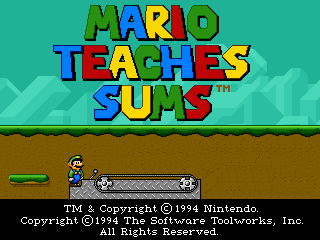
The soundtrack handling introduces its own oddities depending on your sound setup. Technical logs on the VOGONS Wiki document how the European CD-ROM release routes FM synthesized music data. The game engine sends audio commands over non-standard MIDI channels, causing missing notes or completely wrong instrument choices on certain synthesizer hardware. If your MIDI setup expects standard General MIDI mapping, the background tunes tend to glitch out, leaving you with bizarre synth tones playing behind Mario's voiced instructions.
Judging this release against traditional platformers misses what it was actually trying to accomplish in 1993. If you look at standard games of the era, the goal was mastering tight controls and clearing difficult levels. Here, the focus was entirely on absolute accessibility for tiny hands holding a mouse for the first time. It sits firmly within the early-90s wave of educational PC titles, sharing space with software built for classrooms and home learning centers rather than arcades.
What plainly fails to hold up today is the sheer brevity of the content. Once a child grasps basic counting up to ten and simple shape grouping, there is nowhere left for the software to go. The activities repeat the same template without escalating in complexity or introducing new mechanics. It fulfilled its specific brief for preschool software thirty years ago, but anyone looking for mechanical depth will run out of things to see in less than a quarter of an hour.
If you want to experience this strange slice of licensed Mario history for yourself, you can play Mario Teaches Sums free in your browser right now. You can run the full MS-DOS version of the game with a single click, with no software setup required. Modern players usually expect to find hidden minigames or secret Mario cameos buried in the code, but clicking through the map quickly reveals just how strictly committed it was to pure preschool counting. Click on the map, test out the audio-guided math prompts, and see how Nintendo's flagship plumber sounded when his only job was helping toddlers learn their numbers.
Mario Teaches Sums trades jump buttons and fire flowers for simple point-and-click math puzzles aimed straight at toddlers.
Boot up this 1993 MS-DOS game and you will not find any Goombas to stomp or Bowser castles to invade. Instead, Mario Teaches Sums drops you onto an island map where clicking a location sends Mario, Princess Peach, or Yoshi into a brief, spoken arithmetic exercise. Developed by The Software Toolworks and published by Mindscape, the software replaces platforming momentum with basic counting, shape identification, and simple addition. If you came expecting the tight physics of a standard Mushroom Kingdom adventure, watching Mario stand patiently while a digitized voice asks you to point at three apples is quite a shift.
Every mini-game revolves around immediate audio feedback. In activities like Number's World, the game reads out every instruction, number, and displayed word out loud, making it usable for early learners who cannot read yet. You point the mouse cursor at the correct group of items or the matching digit, click, and receive a cheery voice confirmation before moving to the next set. There are no secret exits, no time limits, and zero penalty for picking the wrong answer, which keeps the experience stress-free for tiny kids while leaving older players with very little to actually manage.

The total lack of platforming was completely by design. The developers brought in child development specialists, educational researchers, and speech language teachers to build an interactive tool specifically tailored for pre-school learning. Across North America, the software originally shipped under the title Mario's Early Years! Fun with Numbers. When it crossed the Atlantic for its European release, the publisher rebranded it to cash in on the name recognition of their earlier typing tutor, creating a loose educational series alongside its sister title, Mario Teaches Words.
Because it targeted three-year-olds, the core design stripped away everything that could cause frustration. You will search in vain for high scores, inventory items, or game-over screens. While that approach made it genuinely useful for teaching early counting, retro software commentators on sites like The Cutting Room Floor have noted how bare the package feels when viewed as a standard video game. It is a set of digital flashcards wearing a Nintendo skin, designed to keep a toddler occupied at a desktop computer for twenty minutes.
Audio drives the entire package, which makes the technical quirks of its PC release glaringly obvious. Because voice clips guide the child through every screen, compatible sound hardware was mandatory to get any real value out of it. Hearing clear speech through a standard PC speaker in 1993 was a scratchy affair, making a Sound Blaster card the only practical way to hear the spoken instructions properly.

The soundtrack handling introduces its own oddities depending on your sound setup. Technical logs on the VOGONS Wiki document how the European CD-ROM release routes FM synthesized music data. The game engine sends audio commands over non-standard MIDI channels, causing missing notes or completely wrong instrument choices on certain synthesizer hardware. If your MIDI setup expects standard General MIDI mapping, the background tunes tend to glitch out, leaving you with bizarre synth tones playing behind Mario's voiced instructions.
Judging this release against traditional platformers misses what it was actually trying to accomplish in 1993. If you look at standard games of the era, the goal was mastering tight controls and clearing difficult levels. Here, the focus was entirely on absolute accessibility for tiny hands holding a mouse for the first time. It sits firmly within the early-90s wave of educational PC titles, sharing space with software built for classrooms and home learning centers rather than arcades.
What plainly fails to hold up today is the sheer brevity of the content. Once a child grasps basic counting up to ten and simple shape grouping, there is nowhere left for the software to go. The activities repeat the same template without escalating in complexity or introducing new mechanics. It fulfilled its specific brief for preschool software thirty years ago, but anyone looking for mechanical depth will run out of things to see in less than a quarter of an hour.
If you want to experience this strange slice of licensed Mario history for yourself, you can play Mario Teaches Sums free in your browser right now. You can run the full MS-DOS version of the game with a single click, with no software setup required. Modern players usually expect to find hidden minigames or secret Mario cameos buried in the code, but clicking through the map quickly reveals just how strictly committed it was to pure preschool counting. Click on the map, test out the audio-guided math prompts, and see how Nintendo's flagship plumber sounded when his only job was helping toddlers learn their numbers.
aka Mario's Early Years! Fun with Numbers · Mario apprend à compter
How Mario Teaches Sums is played — the keys the game listens to, grouped by what they do.
Highlighted keys are mapped — hover or tap one to see what it does.
Key map is incomplete due to limited documented sources for specific keybinds. The game is primarily driven by mouse interaction.
The on-screen keyboard and gamepad mapping the browser player uses on a phone, a tablet or a controller, as opposed to the real keys above. $PRO members make their own in the player and share them here; anyone can pick one to play with.
Cheat codes, console commands and memory pokes for Mario Teaches Sums — each one verified and attributed.
Sign in to submitHow Mario Teaches Sums is played — the keys the game listens to, grouped by what they do.
Highlighted keys are mapped — hover or tap one to see what it does.
Key map is incomplete due to limited documented sources for specific keybinds. The game is primarily driven by mouse interaction.
The on-screen keyboard and gamepad mapping the browser player uses on a phone, a tablet or a controller, as opposed to the real keys above. $PRO members make their own in the player and share them here; anyone can pick one to play with.
Cheat codes, console commands and memory pokes for Mario Teaches Sums — each one verified and attributed.
Sign in to submit