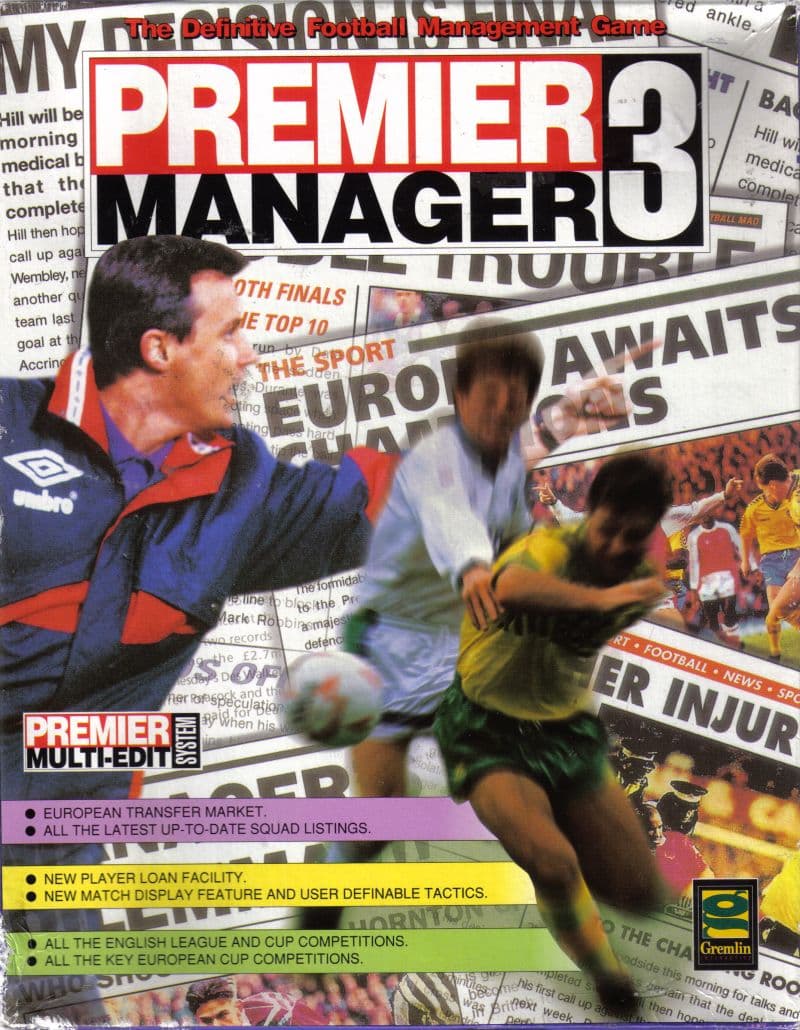
Premier Manager 3
aka PM3
Checking…
Starting a new run in Premier Manager 3 means taking charge of a scruffy fifth-division team in the English Conference League. Armed with a virtual fax machine and a tight bank balance, your ultimate goal is to reach top-flight league dominance.
You start in the Conference with a fax machine and a budget crisis
Opening the manager dashboard drops you straight into a grid of 12 main icons. You have a telephone for contacting staff, a fax machine for transfer deals, and financial spreadsheets that demand immediate attention. Before you even think about setting up training schedules, you are forced to look at stadium seating and sponsor hoardings.
Developers Realms of Fantasy built the simulation so off-pitch management felt every bit as demanding as squad selection. You can apply for bank loans, build new stands, and install undersoil heating for your pitch. Assigning individual corporate logos to specific sections of your stadium ground brings in vital income for transfer fees.
For players jumping into sports games from 1994, this financial depth could feel overwhelming. If you leave your stadium neglected or ignore sponsor board updates, your weekly cash flow quickly dries up. Thankfully, publisher Gremlin Interactive added the option to hire an Assistant Manager. A good assistant automates daily tasks like contract talks, injury treatment, and sponsor management so you can focus on winning matches.
Premier Manager 3 forces you to balance bank loans against tactical depth
Once your finances stabilize, setting up your team requires careful positioning across the pitch. Premier Manager 3 lets you assign player positions dynamically depending on which sector of the field contains the ball. This pitch-sector system works much like Sensible World of Soccer, giving you direct control over defensive shifts and attacking runs.
Your backroom staff play a central role in keeping squad performance high. Using the in-game telephone lets you call coaches to improve specific skills or send scouts across the country for fresh talent. Managing player contracts via the virtual fax machine keeps transfer negotiations fast and direct.
The tactical depth requires serious attention to detail. Assigning players to positions they dislike quickly drains their effectiveness on matchday. If your star striker suffers an injury, getting him back onto the pitch requires a solid medical setup managed by your backroom team.
Watching the match engine reveals every single defensive error
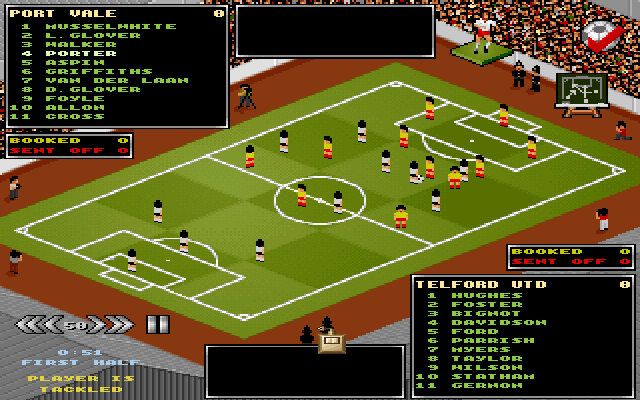
When matchday arrives, the view shifts to a full isometric pitch display. Designers John Atkinson, Paul Atkinson, Alex Kewin, and Tony Casson expanded this engine to show detailed ball movement and individual player touches across ninety minutes. Hearing Patrick Phelan’s energetic synth soundtrack playing over match setups puts you right into the tactical mindset.
The match view works as a genuine analytical tool. Watching your defense collapse on a counter-attack lets you isolate tactical mistakes and fix player positioning for the next game. You can see precisely when a midfielder fails to track back or when a defender pushes out of line.
The graphics do not offer realistic facial details or smooth modern animations, but the tactical clarity works well. Every pass, clearance, and tackle displays clearly on the pitch. You always know whether a loss came from poor tactics or an underperforming squad.
Board satisfaction can end a brilliant run without warning
Despite its detailed simulation work, the game carries a few frustrating design choices. Your success is tracked through a three-tier rating system that evaluates organizational skills, fan popularity, and owner satisfaction. If your rating with the club board drops too far, the game fires you without room for appeal.
This firing mechanic stings because there is no option to move to another club. Getting sacked simply ends your game run outright, wiping away seasons of effort. Players who built a small club into a contender could find their career ended abruptly over a brief slump in form.
Save management on floppy disks was another headache for original PC players. Backing up save files required careful disk swapping, and losing progress to corrupted saves was a common complaint. There are also no cheat codes or secret shortcuts to rescue a bankrupted team, though Gremlin later released the Premier Multi-Edit System utility to let players alter team statistics manually.
Why Premier Manager 3 still warrants an afternoon on your desktop
If you enjoy classic football management, this Premier Manager 3 MS-DOS game offers a focused challenge. Balancing bank loans, stadium expansions, and squad tactics from a single desktop interface remains rewarding. The addition of the Assistant Manager means you can skip routine chores and concentrate purely on your tactical strategy.
You can play Premier Manager 3 free in your browser right now. You can jump straight into managing a fifth-tier club without searching for old MS-DOS game floppies or dealing with disk saves. Pick your starting team, set up your fax machine, and see if you can take a Conference squad all the way to top-flight glory.
How Premier Manager 3 is played — the keys the game listens to, grouped by what they do.
- Interface
- Left click — Select options and navigate menus
Highlighted keys are mapped — hover or tap one to see what it does.
Premier Manager 3 requires a mouse and mouse driver installed. Keyboard input is used for typing the manager's name during game setup.
Players' controls
Touch and gamepad controls
The on-screen keyboard and gamepad mapping the browser player uses on a phone, a tablet or a controller, as opposed to the real keys above. $PRO members make their own in the player and share them here; anyone can pick one to play with.
Make your own touch controlsPRO
- 1Open the editorSign in below, then pick what to make. The game starts with the editor open over it.
- 2Place your keysAdd keys and drag them where your thumbs rest, or map a controller's buttons. Test plays the game with them; Save keeps them, and you play with them from then on.
- 3Share themShare them right after saving in the game, or name and share them here. Players vote, and the best become this game's controls for everyone.
Go PROSee how it worksSign in+20 XP for sharing · +50 XP if yours become the game's own
- The game's own controlsKeyboardGamepadWhat every player starts with.In use
2 screenshots
From the archive
No gameplay video yet
No gameplay video for Premier Manager 3 yet. Sign in to add one.
No reviews yet
Tell the community what you think of Premier Manager 3. Reviews are public and tied to your username.
No archived manuals for Premier Manager 3 yet
No manuals archived for this title yet. Sign in to upload the first scan.
Cheat codes, console commands and memory pokes for Premier Manager 3 — each one verified and attributed.
Sign in to submitNo cheats yet for this title
Know a working cheat, poke or trainer? Add it with the button above. Moderators check every entry before it goes live.
No archived soundtrack for Premier Manager 3 yet
No soundtrack archived for this title yet. Sign in to upload the first rip.
No save states for Premier Manager 3 yet
No save states for this title yet. Sign in to share one.
Discussions
Sign in to post- Threads0
- Total posts0
- Online now6
Community · Premier Manager 3
Who's contributing, and what's new
- Reviews0
- Threads0
- Uploadsapproved0
- Contributors0
Recent activity
Nothing here yet
Reviews, discussion threads and approved uploads appear here as members add them.